
When it comes to Mac-based DPM software, only one came to mind: MacPractice DDS. With an install base of 25,000 users across their inventory of healthcare practice management software (45% of which are dental), MacPractice is *the* major player, with MacDent Pro a distant second. After scheduling an in-office demo, we entertained the sales person's presentation, where the software's strong points were emphasized while the shortcomings are tucked away. In the end, what choice did I have? If I wanted to go Mac, then the choice was MacPractice DDS. As one member of my staff commented, "It won't be easy at first, but we will learn whatever you end up with."
An aside. I did briefly consider Curve Dental. Because it was cloud-based, this DPM could be accessed on a Mac (or PC). In fact, because the various Mac workstations would not have to access a server, the office network would function mainly to provide internet access to each station, along with access to network printers. You'd obviously want your "bulletproof" internet access as best as you could, but, my gosh, you could get by with extremely rudimentary hardware who's main mission was solely to access the net. I must admit that our office has had more than a handful of days where the internet was down for one reason or another. Because our DPM software was in-house, the brief lack of internet access was more of a nuisance, but it would be much more than that if it occurred with a cloud-based DPM like Curve! However, what really steered me clear from Curve . . and again I use the caveat "at the time of this writing" . . is whether or not your data "somewhere up in the cloud" would be retrievable if you decide to cancel service with Curve. The service is so new that this data issue remains a gray area.
The Hardware: Give Me A Mac Pro
This is the fun part. I get to rekindle the joy of building a computer to my liking. Initially, I was planning on using a 27" iMac outfitted with an internal solid-state drive (SSD) along with a secondary conventional hard drive for additional storage. I surmised that the SSD's superior data access speeds would work wonders for a program like MacPractice. However, after doing my due diligence (which consisted of perusing the various forums), I quickly decided that, in terms of reliability, the SSD isn't ready for prime time. There seemed to be a troubling propensity for drive failures amongst some various makes, and the last thing you'd want to happen to your server is a hard drive failure. This was more or less confirmed by the local IT consultant who contracts with MacPractice; none of the installations in the region contained any SSDs. In fact, knowing that I was leaning towards a Mac Pro, the consultant recommended that I install two internal 2TB hard drives in a RAID 1 mirror. Absolutely not a problem with the Mac Pro's easily-accessible drive bays. Contrarily, it would have been darn near impossible to install a RAID mirror amongst two internal drives in an iMac.
There is another troubling issue with Apple's latest iMacs. An OWC blog entitled "Apple Further Restricts Upgrade Options on New iMacs" in my opinion, absolutely rules out the use of the iMac as the practice's mission-critical server.
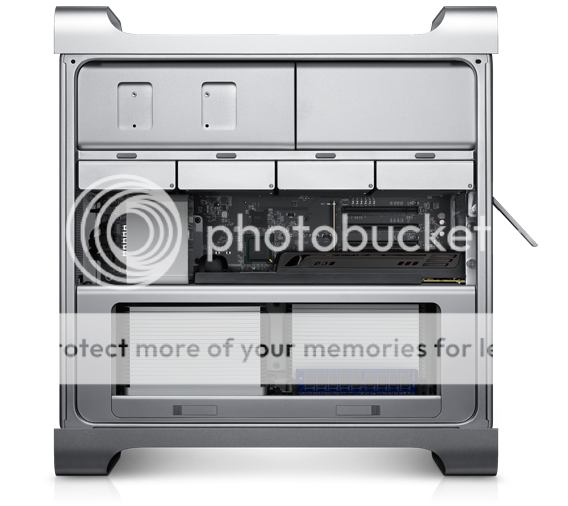 |
| Mac Pro |
I am a strong believer in redundant backups. We'd be hard-pressed to recall by memory a day's worth of procedures and appointments. Imagine losing an entire year or years' worth of data! That would be catastrophic. Hence, multiple backup strategies. Because of a Mac Pro's internal expansion capabilities, I was planning on installing an eSATA controller card, so that I could back-up to an attached external drive. You certainly do not need to have eSATA, but I already own a couple of external drives with this interface, and thought that I'd make use of the greater speed.
Finally, a MacPro would allow me the flexibility of change. Say that a SSD is proven more reliable than a HDD. I could easily swap the internal HDDs for their solid-state counterparts. I should note that there is some talk amongst some Apple "insiders" that the Mac Pro line may ultimately be discontinued. As it stands, the Mac Pro in its current iteration has not been updated since November 2010. Apple typically is much quicker at refreshing its product line. For instance, according to the Mac Buyer's Guide at MacRumors.com, the iMac is refreshed every 273 days, while a MacBook Pro averages 267 days. This contrasts dramatically with the last time the MacPro changed model designations: 495 days and counting. If you're a betting person, then the next refresh is due any time. However, if the rumor mill is running rampant that there may not be a refresh . . ever, and if you need to accelerate a bit of spending (think Section 179) come year end, then the time is now to jump on the Mac Pro.
Next up: The Parts List

